Computer Hardware Repair

From Screen to Motherboard: Your Ultimate Guide to Computer Hardware Repair

We’ve all been there. You’re in the middle of a deadline, or finally settling in for a gaming session, and suddenly—blackout. Or maybe it’s the dreaded “crunch” of a laptop screen meeting a floor it wasn’t supposed to visit.

At Lubbock Computer Professional Repair, we see tech heartbreaks every day. But here’s the good news: most hardware issues aren’t terminal. Whether it’s a flickering display or a silent motherboard, understanding the “how” and “why” of repairs can take the mystery out of your machine.


1. The Gateway: Screen & Display Issues

The screen is your window into the digital world, and it’s also the most vulnerable component.

  • The Cracked Screen: Modern laptops use incredibly thin LCD or OLED panels. A single drop can spiderweb the glass. In most cases, we don’t just “fix” the glass; we replace the entire display assembly to ensure factory-level clarity.

  • The “No Signal” Mystery: If your desktop monitor is dark but the PC is humming, the culprit is often the GPU (Graphics Processing Unit) or a faulty cable.

  • Backlight Failure: If you can see a faint image when holding a flashlight to the screen, your backlight or inverter has likely given up the ghost.


2. The Internal Organs: RAM and Storage

If your computer feels sluggish or keeps “Blue Screening,” the problem is often found in these two areas.

  • RAM (Random Access Memory): Think of RAM as your computer’s short-term memory. If a stick of RAM fails, your computer might beep at you or refuse to boot. Upgrading RAM is often the most cost-effective way to breathe new life into an old PC.

  • Storage (SSD vs. HDD): If you’re still running an old-school mechanical Hard Drive (HDD), you’re driving a tractor on a highway. Moving to a Solid State Drive (SSD) is like switching to a jet engine.


3. The Central Command: The Motherboard

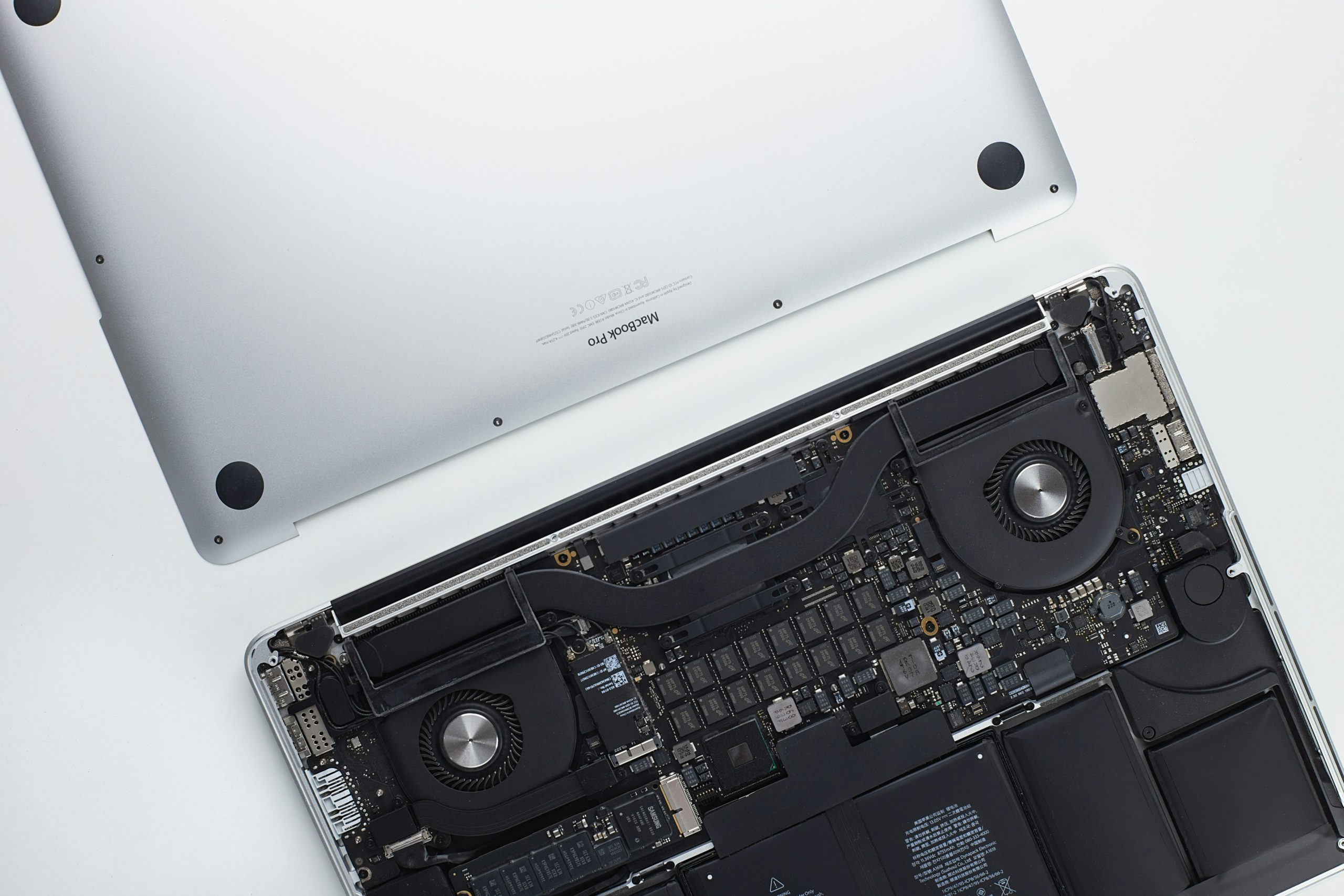
The motherboard is the nervous system of your computer. It connects everything—the CPU, the power supply, and your peripherals.

Repairing a motherboard is the “brain surgery” of the tech world. Common issues include:

  • Blown Capacitors: Small components that can leak or bulge due to power surges.

  • Corrosion: Usually the result of that coffee spill you thought you cleaned up last month.

  • Socket Damage: Bent pins where the processor sits.

Pro Tip: If your computer won’t turn on at all, we always check the CMOS battery first. It’s a tiny watch battery on the motherboard that, if dead, can sometimes prevent the whole system from posting!


4. The Silent Killer: Heat and Dust

If we had to pick one enemy of computer hardware, it’s heat. Over time, the thermal paste—a conductive material that sits between your processor and its cooling fan—dries out and becomes brittle.

$$T_{operating} < T_{junction}$$

When your internal temperatures exceed safe limits, your hardware “throttles” (slows down) to protect itself. Regular internal cleaning and a fresh application of thermal paste can extend your computer’s life by years.


When to DIY vs. When to Call the Pros

We love a good weekend project as much as anyone, but hardware repair carries risks:

  1. Static Electricity: A single “zap” from your fingertip can fry a $500 motherboard.

  2. Proprietary Screws: Manufacturers love using tiny, specialized screws that strip easily if you don’t have the right kit.

  3. Warranty Concerns: Opening your device often voids your manufacturer protection.

Need a Fix in the Hub City?

If your tech is acting up, don’t panic. From simple screen swaps to complex motherboard soldering, the team at Lubbock Computer Professional Repair is here to get you back online.

Stop by our shop or give us a call today—let’s get that machine running like new!

malware

The Dangers of Malware: How to Protect Your Computer

Whether you’re a student at Texas Tech, a small business owner in the Depot District, or just someone who enjoys scrolling the web at a local coffee shop, your computer is your lifeline. But in 2026, that lifeline is under constant attack.

At Lubbock Computer Professional Repair (cprlbk.com), we’ve seen a massive shift in how malware operates. It’s no longer just about annoying pop-ups; it’s about sophisticated, AI-driven threats that want your data, your identity, and your money.

Here is what you need to know about the dangers of malware and how to stay protected in the modern digital landscape.


The Evolution of Malware in 2026

Malware (malicious software) has gone through a “glow-up,” but not the kind we like. Today’s threats are faster and harder to detect than ever before.

  • AI-Powered Phishing: Gone are the days of obvious typos. Hackers now use AI to write perfect emails that sound exactly like your bank or a trusted colleague.

  • Ransomware 2.0: This doesn’t just lock your files; it threatens to leak your private photos and documents to the public if you don’t pay.

  • Deepfake Scams: You might receive a “video call” or voice memo from someone you know asking for emergency funds. In reality, it’s a high-tech digital mask.

  • IoT Vulnerabilities: Your smart fridge or security camera can be a “backdoor” for hackers to enter your main computer network.


Red Flags: Is Your Computer Already Infected?

If your PC or Mac is acting “moody,” it might not just be old age. Look out for these signs:

  1. Sudden Sluggishness: If simple tasks take forever, malware might be hogging your processing power to mine cryptocurrency in the background.

  2. The “Ghost in the Machine”: Programs opening and closing on their own, or your mouse moving independently.

  3. Fan Overdrive: Your computer fan sounds like a jet engine even when you’re only checking email.

  4. Strange Pop-ups: Seeing alerts about “system errors” or “security threats” that don’t look like your usual antivirus.


How to Protect Your Digital Life: The 2026 Checklist

Prevention is always cheaper and less stressful than a repair. Follow these steps to harden your defenses:

1. The 3-2-1 Backup Rule

Never rely on a single save.

  • 3 copies of your data.

  • 2 different types of media (e.g., an external hard drive and cloud storage).

  • 1 copy stored offline (unplugged from your computer) to keep it safe from ransomware.

2. Enable Multi-Factor Authentication (MFA)

A password is no longer enough. By requiring a code from your phone or a fingerprint, you stop 99% of automated attacks even if a hacker steals your password.

3. Patching is Your Shield

When Windows or macOS asks you to update, do it. Most updates aren’t for “new features”—they are “security patches” that plug holes hackers are currently using to get into systems.

4. Practice “Zero Trust”

In 2026, the best policy is to trust no one online.

  • Don’t click links in “urgent” text messages or emails.

  • Always go directly to a website by typing the address yourself.

  • If a friend asks for money via a weird message, call them to verify.


Professional Help When You Need It

Sometimes, despite our best efforts, a virus slips through. If you suspect your computer has been compromised, turn it off immediately to stop the spread and bring it to the pros.

At Lubbock Computer Professional Repair, we specialize in:

  • Deep System Scans: Finding hidden “rootkits” that standard antivirus misses.

  • Data Recovery: Helping you get your files back after a crash or attack.

  • Security Hardening: Setting up your system so it’s a fortress against future threats.

Don’t wait until your screen turns blue or your files are encrypted. Stay vigilant, stay updated, and keep Lubbock’s tech running strong.


Worried your computer might be compromised? Contact us at cprlbk.com today for a comprehensive security health check and let’s make sure your data stays where it belongs—with you.

Gaming PC Experts

Why You Need Lubbock’s Trusted Gaming PC Experts for Your Next Rig

In the world of high-performance computing, there is a massive difference between a “computer that can play games” and a machine optimized for elite performance. When your frame rates drop or your system overheats during a crucial match, you don’t just need a repairman—you need Gaming PC Experts.

At CPR – Computer Professional Repair, we’ve been Lubbock’s go-to tech authorities since 1986. We’ve watched gaming evolve from pixelated sprites to the photorealistic, AI-driven powerhouses of 2026. Here’s why our team stands out as the premier Gaming PC Experts in the West Texas area.


Precision Diagnostics by Gaming PC Experts

A standard office PC doesn’t deal with the intense thermal loads or driver complexities that a gaming rig does. Our PC Experts understand the unique ecosystem of high-end hardware.

  • Thermal Optimization: We don’t just clear out dust. We analyze airflow patterns, re-apply enthusiast-grade thermal paste, and ensure your liquid cooling loops are functioning at peak efficiency.

  • Hardware Bottlenecking: Not sure why your new GPU isn’t performing? Our Gaming PC Experts can identify if an older CPU or slow RAM is holding your system back.

  • Stability Testing: We use industry-standard stress tests to ensure your PC won’t crash when the action gets intense.


Custom Builds: Designed by Gaming PC Experts

Why buy a “big box” pre-built when you can have a machine tailored to your specific playstyle? As Gaming PC Experts, we believe every component matters. We help you select the right parts for 2026’s most demanding titles, focusing on:

  1. High-Speed Storage: Utilizing NVMe Gen5 drives for near-instant load times.

  2. Future-Proofing: Selecting motherboards and power supplies that can handle the next generation of upgrades.

  3. Aesthetic Excellence: From clean cable management to synchronized RGB lighting, our  PC Experts make sure your rig looks as good as it performs.


The CPR Difference: Local Gaming PC Experts

When you bring your rig to Computer Professional Repair at 5212 82nd Street, you aren’t sending your gear to a distant warehouse. You are handing it to local Gaming PC Experts who treat your hardware with the respect it deserves.

Expert Advice: In 2026, 32GB of RAM is becoming the new standard for seamless multitasking and high-end gaming. If you’re still running 16GB, come talk to our Gaming PC Experts about a quick and affordable upgrade.


Level Up Your Performance Today

Don’t let technical glitches or outdated hardware keep you off the leaderboard. Whether you need a complex liquid-cooling repair or a brand-new custom build, the Gaming PC Experts at CPR are here to help.

Stop by our shop or call us today to see how we can optimize your gaming experience!

Tune-Up

New Year, New Computer: Why a Professional Tune-Up Is a Great Idea

The holiday season is behind us, and the “New Year, New Me” resolutions are in full swing. We set goals for our fitness, our finances, and our homes—but what about the device that helps you manage all of it? A professional tune-up is a great way to start 2026.

Whether you’re a student at Texas Tech, a local business owner, or someone keeping up with family photos, your computer is likely the MVP of your daily life. Over the last year, it has likely accumulated a lot of “digital weight”—bloatware, temporary files, and perhaps even some hidden malware.

If your laptop or desktop isn’t feeling as fast as it did last January, a professional tune-up is the best way to kick off 2024. Here is why a visit to CPR – Computer Professional Repair in Lubbock is exactly what your tech needs.

1. Clear Out the Digital Clutter

Just like your home needs a deep clean, your operating system needs one too. Over time, every website you visit and every app you install leaves behind “footprints” in the form of cache files and registry errors. A professional tune-up goes deeper than a standard “trash bin” empty. We identify and remove unnecessary background processes and “bloatware” that steal your RAM and slow down your boot-up time.

2. Boost Your Speed Without Buying New

Many people think a slow computer means it’s time to head to a big-box store for a new one. In reality, most computers are still hardware-capable; they are just bogged down by software inefficiency. Our technicians can optimize your system settings to ensure your CPU and memory are dedicated to the tasks you actually care about. Often, a professional tune-up can make a 3-year-old computer feel like it just came out of the box.

3. Hidden Security Checks

The start of the year is a prime time for cyber threats. During a professional tune-up, we don’t just look for speed; we look for safety. We perform deep scans for viruses, spyware, and malware that your standard free antivirus might have missed. We also ensure your operating system and drivers are fully updated to patch any security vulnerabilities.

4. Physical Longevity (The Dust Factor)

Lubbock is famous for its wind and dust. If you haven’t had your computer professionally cleaned in a year, there is a high chance that dust has settled on your fans and heat sinks. This causes your computer to run hot, which leads to “thermal throttling”—where your computer intentionally slows down to prevent itself from melting. We provide professional internal cleaning to keep your hardware cool and extend its lifespan.

5. Specialized Upgrades

While we’re tuning your software, we can also advise if a simple hardware upgrade could give you a massive boost. Sometimes, adding a little more RAM or switching an old spinning hard drive to a Solid State Drive (SSD) can make your computer 5x faster for a fraction of the cost of a new machine.


Start the Year at Peak Performance

Don’t let a lagging computer hold back your New Year’s productivity. At CPR – Computer Professional Repair, we’ve been serving the Lubbock community since 1986. We’re locally owned, locally operated, and dedicated to keeping your tech running beautifully.

Stop by and see us today! 📍 5212 82nd Street, Lubbock, TX 📞 (806) 794-5333 🌐 www.cprlbk.com

New Year. Fresh Start. Fast Computer.

malware

How to Keep Your Computer Running Smoothly: A Lubbock Professional Repair Guide

Is your computer running slower than molasses in January? You know the feeling: that frustrating lag, the unexpected freeze, or the endless loading icon. Whether you use your computer for work, school, or entertainment here in Lubbock, dealing with poor performance is a major drain on your time and patience.

The good news is that many performance issues can be prevented with simple, consistent maintenance. While we are always here at CPR Lubbock (cprlbk.com) to handle the complex repairs, here are five essential tips to help you keep your machine running smoothly for months and years to come.


1. Be Aggressive About Cleaning Up the Clutter

Think of your computer’s hard drive and desktop like your real workspace—clutter slows you down.

  • Uninstall Unused Programs: Go through your installed programs list and remove anything you haven’t touched in six months. Many programs run background processes that consume valuable resources, even when you aren’t actively using them.

  • Declutter the Desktop: Every icon on your desktop is a small file that your computer must load every time you boot up. Move documents, photos, and miscellaneous files into organized folders stored elsewhere on your drive.

  • Empty the Downloads Folder: This folder is a digital junk drawer. Unless you specifically need a file from there, move it or delete it regularly.

  • Clear Browser Cache: Over time, your web browser stores thousands of temporary files (cache). Clearing this out periodically can speed up your browser and free up disk space.


2. Manage Startup Programs (The Sneaky Performance Hogs)

When you turn your computer on, dozens of programs often launch automatically in the background—many of which you don’t need immediately. This is the single biggest culprit for slow boot times.

  • How to Check: Use the Task Manager (Ctrl+Shift+Esc on Windows or consult System Preferences on Mac). Look for the “Startup” tab.

  • The Fix: Disable programs that aren’t essential, like messenger apps, game launchers, or cloud sync tools. Important: Only disable programs you recognize. If you are unsure about an item (like security software or critical system files), leave it enabled, or contact us for help.


3. Update Your System and Software Regularly

Those annoying “Update Now” notifications are your friend, not your enemy! Regular updates do more than just add new features:

  • Security: Updates patch critical security vulnerabilities that hackers often exploit. Keeping your system updated is your best defense.

  • Performance & Compatibility: Software developers often release updates to improve performance, fix bugs, and ensure compatibility with newer operating systems and hardware.

Make it a habit to accept operating system updates (Windows, macOS) and application updates as soon as they are available.


4. Don’t Ignore Security: Run Regular Scans

Even the most careful computer user can accidentally download a virus or malware that severely slows performance by running malicious processes in the background.

  • Use Quality Antivirus Software: Ensure you have reputable antivirus or endpoint security software installed and running.

  • Schedule Scans: Set your security program to run a deep, full system scan at least once a month. Schedule it for a time when you aren’t actively using your computer (like overnight).

  • Beware of Scams: Never click on pop-ups that claim your computer is infected and prompt you to download a program to fix it. If you suspect an infection, bring your machine to us immediately.


5. Physical Health: Give Your Hardware a Break

Computer longevity isn’t just about software—it’s about hardware maintenance, especially heat.

  • Avoid Overheating: Heat is the #1 killer of computer components. Ensure your laptop vents are clear. Never use a laptop on soft surfaces like blankets, pillows, or carpet, as these block airflow. Use a hard desk or a cooling pad.

  • Power Down: Instead of constantly leaving your computer running, shut it down completely at least once a week. This clears temporary memory (RAM) and gives your physical components a chance to cool down fully.


When Prevention Isn’t Enough, Call the Lubbock Pros

We know that sometimes a slow computer means more than just a little clutter—it could signal a failing hard drive, a dying battery, or serious malware infection.

If you’ve run through these tips and your computer is still slow, unstable, or exhibiting strange behavior, it’s time to call in the experts. At Lubbock Professional Repair (CPR Lubbock), we offer fast, reliable diagnostics and repair services right here in the Hub City.

Don’t let a slow computer derail your productivity. Stop by our shop or schedule your diagnostic service today!